Monday, October 19, 2020

MeeGo @ 1st Glance

New Era of Mobile OS :

On February 15, 2010, the world’s largest chip manufacturer, Intel, and the world’s largest mobile handset manufacturer, Nokia, announced joining their existing opensource projects (Moblin and Maemo respectively) to form a new project called MeeGo, hosted at the Linux Foundation.This Post provides an introduction to the MeeGo project, a brief overview of the
MeeGo architecture.

Basics Of MeeGo:

   MeeGo is a Linux-based platform that is capable of running on multiple computing devices, including handsets, netbooks, tablets, connected TVs and in-vehicle infotainment systems.The primary goal of the merger of the Maemo and Moblin projects was to unify the efforts of the Moblin and Maemo communities and to enable a next generation open source Linux-platform suited for a variety of client devices.With the merger, the MeeGo project has now the opportunity to significantly expand the market opportunities on a wide range of devices and support multiple chip architectures (ARM and x86) from
the get go


MaeMo Platform:

   Maemo is a software platform which was initiated by Nokia  is mostly based on open source code and powers mobile devices such as the Nokia N810 Internet Tablet. Maemo platform has been developed by Nokia in collaboration with many open source projects such as the Linux kernel , Debian , GNOME , and many more.
For more info click MaeMo Platform

Moblin Platform:

     Moblin project, short for Mobile Linux, is Intel’s open source initiative ,created to develop software for smartphones, netbooks, mobile internet devices (MIDs), and in-vehicle infotainment (IVI) systems, and other mobile devices.For more info click Moblin Platform


MeeGo Architecture :

    MeeGo provides a full open source software stack from core operating system up to user interface libraries and tools. Furthermore, it offers user experience reference implementations and allows proprietary add-ons to be added by vendors to support hardware, services, or customized user experiences.
Figure below  illustrates the MeeGo architecture as divided into three layers:

     
    •     The MeeGo OS Base layer consists of the Hardware Adaptation Software required to adapt MeeGo to support various hardware architectures and the Linux kernel and core services .
For more Info Click here
•     The MeeGo OS Middleware layer provides a hardware and usage model independent API for building both native applications and web run time applications
For more Info Click here:Middleware layer
•     The MeeGo User Experience (UX) layer provides reference user experiences for multiple platform segments. The first UX reference implementation was released on May 25, 2010 and it was for the netbook UX. Other UX reference implementation will follow for additional supported device types.
For more Info Click here:User Experience (UX) layer

      The above figure shows some of the open source projects that are incorporated into MeeGo architecture.There are hundreds of engineers working on MeeGo along hundreds of contributors and more joining
weekly. A partial list of open source projects benefiting from MeeGo upstream
contributions .

Sunday, April 10, 2011

GIT -New generation Source Code Version Control

What is Git?
 
         Git is a open source revision control software developed by Linus Torvalds to manage LinuxKernel Developement.Git development began after many Linux kernel developers chose to give up access to the proprietary BitKeeper system. The copyright holder of BitKeeper, Larry McVoy, withdrew free use of the product after he claimed that Andrew Tridgell had reverse-engineered the BitKeeper protocols.and this eventually led to birth of Git ,which is a fast, scalable, distributed revision control system with an unusually rich command set providing both high-level operations and full access to internals.

         It is written in a collection of Perl, C, and various shell scripts, based on the needs of the Linux kernel project; decentralized , and aims to be fast, flexible, and robust.


 GIT Usage:

       Git Usage in opensource community  is picking up pace as most popular opensource projects have started to use it as a primary revision control software.
Android,meego,linux kernel,Qt,Kde,etc
So for all those who are out to support the opensource community,u must be a real master of this tool ,So lets begin ......
 
Installation:

            Binaries are available in the following link : http://git-scm.com/download
based on the OS download the  binaries and install them respectively.

            But the best and easiest way would be downloading the source as tarball and compiling it .
Here are the steps:

     1)Download the Source from http://kernel.org/pub/software/scm/git/git-1.7.4.4.tar.bz2.

    2)Untar the tarball source

$ tar -jxvf git-1.7.4.4.tar.bz2
   
    3)Change to the appropriate directory and issue the command  'make'
   
(note: Gitcore is dependent on the following libraries libcurl,zlib,libcrypto,rsync so see that these libraries are present before trying to build the git source)
                
$ cd git-1.7.4.4/
$ make prefix=/usr/local install
$ sudo make prefix=/usr/local install
 
               
After the successful installation you are permitted to use the Git tools.

With this installation we can use git only using the commands,ie only with the help of terminal,inorder to use git with ui we need to install any one of the available frontends like  qGit,gitx,gitk etc.

FrontEnds  or the Gui really come in handy when trying to check the history,difference between the versioned files,etc.

 Exploring Git -

Lets create a repository of Linux kernel in our Local pc and start using it with basic available git commands.

1)Creating a Local repository
 
$ mkdir linux-2.6
$ git clone git://git.kernel.org/pub/scm/linux/kernel/git/torvalds/linux-2.6.git linux-2.6
if the provided mirror git link is valid,then we can see the following info on the standard output
    
 
         $ git clone git://git.kernel.org/pub/scm/linux/kernel/git/torvalds/linux-2.6.git linux-2.6
            Initialized empty Git repository in /home/avinash/rnd/linux-2.6/.git/
            remote: Counting objects: 21292000, done.
            remote: Compressing objects: 100% (6111000/6111000), done.
            remote: Total 21292 000(delta 16697000), reused 19111000 delta508500)
            Receiving objects: 100% (21292/21292), 9.65 MiB | 10 KiB/s, done.
            Resolving deltas: 100% (16697000/16697000), done.

above step fetches git object along with the source code,which actually keeps track of the source files and the version information.

2)Updating your local Git repository
      
         we usually tend to update our repository to recive the latest changes that was done by other opensource developers.So it is always good to have the latest updated upstream source tree, this type of updating is referred as fast-forward merge


$ cd linux-2.6
        $ git-pull git://git.kernel.org/pub/scm/linux/kernel/git/torvalds/linux-2.6.git
output on successful execution of the above command
 
receiving file list ... done
         sent 130 bytes  received 11677 bytes  185008.00 bytes/sec
         total size is 237865858  speedup is 5863.52
         Already up-to-date.
        $>

3)Checking files out of the repository
 
   checking out is the act of creating a local working copy or branch from the repository. A user may specify a specific revision or obtain the latest.
to do this we need to use the following command
             
$ git-checkout
 
    if we need to overwrite any of our local modification we can do this by issuing a checkout with -f option to bring back to original form.

     
$ git-checkout -f
          
    In order to view the various branches of the repository we can use the following command

           $ git branch
*master
 
    A freshly cloned repository contains a single branch head, by default named "master", with the working directory initialized to the state of the project referred to by that branch head.

         
$ git tag -l
 
    It will list all the tags used by the project(Tags are references into the project’s history)
 
4) Modifying existing files 
   i) Altering the files and commiting it to the repository is very simple.
Just modify the file which ever you are intended to and issue the following command to the modified file. 
$ git commit  filenamewithpath 
 
$git commit would  prompt the user to provide commit message,which will be useful for other developers
to know what changes were made and their purpose.So it should be a good practice of adding the commit 
message in a precise way.
  
ii)Adding files to the repository                         
 
$ git add file1
 
multiple files can also be added
 
         $ git add file1 file2 file3 
 
This file snapshot is now stored in a temporary staging area which git calls the "index". You can permanently store the contents of the index in the repository with git commit
$ git commit.
 
iii)Removing files can be done with no specific command like adding just deleting and 
issuing commit command will remove the deleted files from repository or using 
$ git rm filename 
will remove files from the working tree and from the index.       


4)Other Basic commands
 
$ git log   -At any point you can view the history of your changes
$ git diff  -show chnages between comits,commit and working tree etc
$ git fetch -Download objects and refs fro another repository
$ git pull  -fetch from and merge with another repository or local branch
$ git push  -update remote refs along with associated objects 
$ git init  -create an empty git repository or reinitialize an existing one
$ git merge -join 2 or more developement histories.
$ git status-shoes working tree status.   

Friday, December 10, 2010

MADDE (Meego Application Developement and Debug Environment)

INTRO:
       
MADDE(Meego Application Development & Debug Environment) is SDK for cross compile and debug  
new application for Maemo and MeeGo.It is not meant to use to build debian packages that use Autotools 
 or anything that  aids compilation by figuring out native system information. 
  • Command-line cross-compiling
  • Multi-platform support (Linux (32-bit/64-bit), Windows, Mac OS X)
  • Configurable for different targets & toolchains
  • Client for the device to simplify the development process
  • Simplicity 
MADDE  is actually a tool that assists in the download and installation of the Target.A Target is used to build programs using the MeeGo toolchain and libraries (sysroot). "mad-admin" is the MADDE command-line tool. You can install multiple Targets and switch easily between them in Qt Creator
 Target is downloaded as a large (~250MB) .bz2 file using the commands below.

Lets check out the various commands and its functions
        

Commands "mad" and "mad-admin"

Basically MADDE can be used and configured by using these two basic commands with different parameters:
  • mad is used for cross-compiling and getting general information.
  • mad-admin is needed to set up and configure the development environment. 

Check the configuration

Before it is possible to use MADDE for cross-compiling, it has to be configured correctly.  To check, which targets of the MeeGo OS  are available, installable or set as default or installed use the command:
       $ mad-admin list
Example output of the above command:       

Targets:
fremantle-1030            (installable)
maemo412-1                (installable)
meego-core-armv7l-1.1     (default)
meego-core-armv7l-trunk   (installable)
meego-core-ia32-1.1       (installable)
meego-core-ia32-trunk     (installable)
meego-handset-ia32-1.1    (installed)
meego-handset-ia32-trunk  (installable)
meego-netbook-ia32-1.1    (installed)
meego-netbook-ia32-trunk  (installable)

Runtimes:
qemu-n900-pr12                                         (installable)
rx48-diablo                                                  (installable)
meego-handset-ia32-qemu-1.1.20101031.2201-sda-runtime  (installed)
meego-netbook-ia32-qemu-1.1.20101031.2037-sda-runtime  (installable)

     From above displayed list  it implies that ,  meego-core-armv7l-1.1 target is installed and set as default. Diablo and others  can be installed, but is not available yet. If a target is set as default, it means that it will be used automatically for cross-compiling, if nothing else is specified.and we can have various targets installed simultaneously and we can switch between them using the Qtcreator which will be discussed later.
 
What actually are these various targets?
 
we need to have a different set of tool chains and libraries in order to build 
MeeGo applications that run on various targets(handset,Netbook,ConnectedTV,along 
with Arm and ia32 etc). 
  • meego-core-armv7l-1.1: Build applications for ARM handheld devices (such as N900)
  • meego-handset-ia32-w32-1.1: Build applications for x86 handheld devices (such as Aava)
  • meego-netbook-ia32-w32-1.1: Build applications for x86 netbooks.
What actually are MeeGo runtimes  & QEMU ?

            A Runtime is the MeeGo OS image that is run with QEMU when debugging applications on your host system. It is not required if you develop against real hardware running MeeGo. It is downloaded as a large (~650MB) .bz2 file using MADDE. The Runtime is not needed until you have finished configuring Qt Creator.

            QEMU is a generic and open source machine emulator and virtualizer.
When used as a machine emulator, QEMU can run OSes and programs made for one machine (e.g. an ARM board) on a different machine (e.g. your own PC). By using dynamic translation, it achieves very good performance.When used as a virtualizer, QEMU achieves near native performances by executing the guest code directly on the host CPU. QEMU supports virtualization when executing under the Xen hypervisor or using the KVM kernel module in Linux. When using KVM, QEMU can virtualize x86, server and embedded PowerPC, and S390 guests.

Install a target/runtime :

If a target is marked as 'installable', it has to be installed, before it can be taken into use. This is done by:
>sudo mad-admin create -f <target/runtime> 
 
 -f instructs the Madde to fetch the tarball(bz2) file and then create the target.
their are chances that this step might fail if we are connected to the internet 
using a proxy .So the solution could be 
 
$ sudo mad-admin fetch [-x proxyhost[:port]] URL|URL_ALIAS

Examples:
$ sudo mad-admin fetch -x http://proxy.host:8080 http://server/path/file.tgz
 Or you can do it like this:

$ zypper addrepo -f http://repo.meego.com/MeeGo/sdk/host/repos/meego/1.1/meego-sdk.repo"
$ export http_proxy="http://username:passwd@<proxy_IP>:<proxy_port>"
$ mad-admin create -f <target> 
 
If the one of the above command goes fine we actually start up the process of downloading 
the tarball file which will take some time and status of the download will be updated in 
the command terminal.
  
Finally Creating the target/runtime :
 
$ sudo mad-admin create <Target/Runtime>
 
example output if runtime is meego-handset-ia32-qemu-1.1.20101031.2201-sda-runtime
$ sudo mad-admin create meego-handset-ia32-qemu-1.1.20101031.2201-sda-runtime
:Extracting QEMU runtime meego-handset-ia32-qemu-1.1.20101031.2201-sda-runtime
.....9....8....7....6....5....4....3....2....1....0
Creating missing links... done.
 
 
Important Note :
Check if the target is installed or not by using  >mad list  at higher level and at lower level check by 
running the following commands . Replace <target> with the ones which are dispalyed as installed in >mad-admin list 
output .
 
 $ mad -t <target> pscreate -t qt-simple qthello $ cd qthello
 $ mad -t <target> qmake
 $ mad -t <target> make

To check that the qt-simple application is created for the correct target, run:
$ file build/qthello

output should be based on the target used which is listed below
1)If you compiled with an IA32 toolchain, you should see something like  this:
 build/qttest: ELF 32-bit LSB executable, Intel 80386, version 1 (GNU/Linux), for GNU/Linux 2.6.25,  
dynamically linked (uses shared libs), for GNU/Linux 2.6.25, not stripped.                 

2)While compiling with an ARM toolchain should yield something like:
 build/qttest: ELF 32-bit LSB executable, ARM, version 1 (SYSV), for GNU/Linux 2.6.25, dynamically linked (uses shared libs), for GNU/Linux 2.6.25, not stripped.


Madde FAQ s: http://meego.gitorious.org/meego-developer-tools/madde/blobs/master/docs/FAQ.rst 

Note: All information posted here is a collection of information from wiki.meego.com and wiki.maemo.org
 

Wednesday, December 8, 2010

A GIST ON BULDING MEEGO SOURCE USING OPEN BUILD SERVICE

Open Build Service (OBS)
       The OBS or Open Build Service is a build farm supplied to the community by Novell. It is used to build OpenSUSE and is going to be used to build MeeGo packages as well. The OBS will be used as a separate instance inside the MeeGo infrastructure. That is to say, there will be a separately maintained OBS dedicated to building MeeGo rpms.In general OBS is  an open and complete distribution development platform. It provides the infrastructure to easily create and release open source software for openSUSE and other Linux distributions on different hardware architectures. The openSUSE instance currently has over 20.000 users that are building about 100.000 packages for 21 base distributions on 6 architectures.


OBS and MeeGo:     
      The heart of the Build Infrastructure of MeeGo is the upstream project openSUSE Build Service (OBS). It is an automated system used for building software packages, collaboration of developers, release management, maintenance, and much more. Moblin started using OBS in June 2008 and released Moblin 2.0 and Moblin 2.1, as well as other derivative releases. OBS has proven to be a very reliable infrastructure that is quickly evolving. It is rich with features for distribution building and maintenance. The Linux Foundation is dedicated to the further development of OBS and has a team, including two full-time OBS maintainers, contributing to its development and its use by MeeGo and the Ecosystem.MeeGo currently uses version 2.0.x of OBS and will soon switch to version 2.1

There are 3 OBS instances that are relevant to MeeGo
  • MeeGo core : essentially, if you're a core package maintainer/developer you get an account here
  • MeeGo community : for anyone to build applications or libraries against MeeGo - anyone with a meego.com account can use this
  • openSuse : this is not for building *against* MeeGo... but we need to support MeeGo tools on many platforms and some of those get built on the openSuse OBS .
 Whats the need of OBS in MeeGo:
  1. It's a build system. You put source on it and say "use this repository" and it builds a minimal SDK-like chroot using the deb/rpms it finds in that repository
  2. It has packages - a package corresponds to a tarball and a spec/dsc
  3. It has projects - a project is like a directory with packages
  4. When a package is built it is "published" from the project where it was uploaded into a corresponding repository (which can be used to build other projects)
  5. The repositories can also be used by devices to download binary packages. 

Monday, December 6, 2010

Differnce Between MeeGo and Android

Releases :
 
 MeeGo  : As an open source software platform, MeeGo will help to reduce market 
          fragmentation and complexity, while helping to accelerate industry innovation 
          and time-to-market for a wealth of new Internet-based applications, services 
          and user experiences.
Android : Created  market fragmentation.
          Frequent code releases  force to upgrade the devices frequently Difference 
          between  two releases  is enormous. Software maintenance is complex in 
          developer’s point of view


License :
 MeeGo  :Fully open source
Android : Consists of Apache, BSD, Open source License:
          Android is going to be established as a “middle ground” in the openness 
          spectrum: more open than proprietary competitors (iPhone, Windows Phone, Blackberry,
WebOS, etc.) and possibly less open than others (MeeGo, Symbian)


Architecture :
 
 MeeGo   :Does not use virtual Machine. Each application is a process.
 Android :Use Dalvik Virtual Machine. Each application runs in its own instance 
          of Virtual Machine. It takes a considerable files to load the huge .jar files.


App development :
 
 MeeGo   : It’s easy  as it supports  libc.
 Android : Android use very scaled down version of libc i.e. Bionic also the 
          pthread library support is very limited.


Maintenance :
 
  MeeGo   :As its maintained by Linux foundation and supports upstream components, 
          the maintenance is easy for the components.
  Android :Maintaining the  additional drivers   and enhancement like binder driver, low 
           memory killer, Logger, kernel Debugger, Ashmem, Alarm, Power management  is  
           uncertain. Kernel is  patched for  enhancement to support Android.
 
Hardware support :

 MeeGO   : New player in the market. will  have more support in future apart from 
           Intel and Arm.
 Android : Has good support for hardware.
 
 
OEM  Companies involved:
 
 Android : Intel, ARM, Marvell, Qualcomm, Nvidia, Texas Instruments,Broadcom, NXP, PacketVideo,
Google, HTC, LG, Motorola, Samsung, Ericsson, Toshiba, Dell, Acer, Garmin (and more)
 MeeGo   : Intel, Nokia

Products released:
 
 Android : more than 200
 MeeGo   : 0

Technologies used: 
 
Android : mostly proprietary
 MeeGo   : mostly shared with FOSS community

Using Linux?: 
 
 Android : kind of a fork
 MeeGo   : yes, close to upstream
 
Programming Lnaguages Used:
 
Android  : Java/J2Me(Java based uses Dalvik Machine as JVM and also Suports native 
coding via NDK)
MeeGo    : C++(QT Based)
 
___________________________________________________________________________________________ 
NOTE  : All information presented here is prepared by combining all the info present 
in the Internet.
Source : http://www.mail-archive.com/meego-dev@meego.com/msg03510.html.

Saturday, December 4, 2010

Gist on Multimedia FrameWork in MeeGo :

Multimedia Multimedia domain provides audio and video playback, streaming, and imaging functionality to the system. In general, the domain takes care of the actual audio and video data handling (retrieval, demuxing, decoding and encoding, seeking, etc.). The domain includes the following subsystems:
Multimedia Component
  • Imaging and Video Adaptation - Platform specific codecs and containers for GStreamer
  • Camera Adaptation - Platform specific codecs and containers for GStreamer. Adaptation interface is CameraBin.
  • UPnP - Universal Plug and Play provides a UPnP stack, the UPnP profile for audio and video.
  • Gstreamer - GStreamer, through its plugins, provides playback, streaming, and imaging functionality to the system.
  • Audio Adaptation - Platform specific modules for PulseAudio
  • Pulse Audio - The audio subsystem handles audio inputs, post and pre processing, and outputs in a system. The purpose is to provide a proxy between audio applications and audio hardware.
Multi Media Stack


QT Mobiltiy  : 
                              QT mobility project delivers a set of new APIs to Qt with features,which allow the developer easily apply in multi platform.QT Mobility covers a collection of apis or frameworks to support the multimedia features to a full extent. this link will provide much more info on QT mobilty and multimedia http://doc.qt.nokia.com/qtmobility-1.0-tp/multimedia.html.

Qt Mobilty's media library  enables developers to easily create applications that make best advantage of the system mediacapabilities and it covers the items of most direct interest to developers:plyback,recording,playlist,management,metadata,radio,mediaediting,TV,etc.

Advantages of QT Mobiltiy multimedia framework:
1)developer can now implement fundamental functions with minimal code.
2)A great deal of flexibility with the media source.
3)Many different codecs are supported 'out of box'


•How to create a video player
–QMediaPlayer:  used for generic player.
–QVideoWidget: control of video source,full screen,etc.
–VideoWidget: inherts from QVideoWidget to add functions, such as double click , particular keypres
  –Three Output Types:  
                         •WindowOutput(X11/Overlay)                                        •RenderOutput(QGraphicsVideoItem) 
                         •WidgetOutput (xvimagesink)  .
Extends the functinality of multimedia class -uses a 3 derived classes from them.


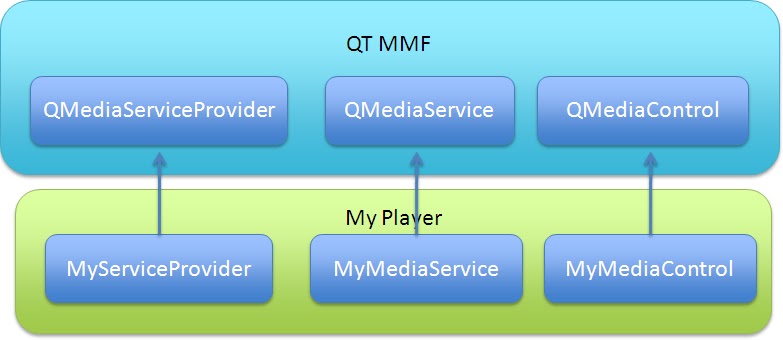
Extended functinality of a new service and a sample application code :


QT Mobilty multimedia framework supports a rich backend
         like Gstreammer,Quicktime,DirectShow,etc
 
Breif on Gstreamer:
             It is a OpenSource  framework for  creating media applications and it as a alone is not a player.it is pipeline  based   media framework written in C programming language witha type system based on Gobject.
              GStreamer allows a programmer to create a variety of media-handling components, including simple audio playback, audio and video playback, recording, streaming and editing. The pipeline design serves as a base to create many types of multimedia applications such as video editors, streaming media broadcasters, and media players.
Designed to be cross-platform, it is known to work on Linux (x86, PowerPC and ARM), Solaris (Intel and SPARC) and OpenSolaris, FreeBSD, OpenBSD, NetBSD, Mac OS X, Microsoft Windows and OS/400. GStreamer has bindings for programming-languages like Python, Vala, C++, Perl, GNU Guile and Ruby. GStreamer is licensed under the GNU Lesser General Public License.
Main Advantages of Gstreamer:
                 Pluggable elements could be mixed to form arbitrary pipelines to support various kinds of audio and vedio codecs.
                          Unified APIS for the devvekoper to create pipelines and media players.
 
Gstreamer Concepts :
 
   ELEMENT :
    –Element is the most important object in Gstreamer, it is derived from GstObject.


    –create a chain of elements linked together and let data flow through this chain of elements           


            PAD:                         
    –Pad is used to negotiate links and data flow between elements in GStreamer
      –Pad could be sink pad or source pad
                  –Pad can restrict the type of data that flows through it.
     BIN & PIPELINE:                  
–A Bin is a container for a collection of elements. E.g. playbin
–A pipeline is a special subtype of a bin that allows execution of all of its contained child elements.
–A pipeline is a top-level bin. As you set it to PAUSED or PLAYING state, data flow will start and media processing will take place.
–GstPipeline is derived from GstBin

AUTOPLUGGING:      
      Want to build a media player that handles various kind of media automatically?
       •Autopluging: 1> Typefinding, 2> Linkage
        –Maintain a Registry for all elements
        –Create a function to filter a list of elements


Hope this info hekps in having some basic idea on the multimedia framework in Meego OS.


Wednesday, October 27, 2010

OS Base layer of MeeGo

               The OS Base layer of MeeGo  consists of mainly two parts Hardware adaptation software and MeeGo kernel .

Hardware Adaptation Software
              
               This part of software involves adapting the entire MeeGo OS platform to various hardware architecture's which the hardware vendor(Basically chipset vendors) must provide and these include platform kernel drivers, core architecture additions, kernel configuration, X software additions and configuration, modem support, and hardware specific media components and all these form the Hardware Adaptation Software Component
Lets Discuss Hardware Adaptation Software Component briefly:
  
KERNEL:
                Kernel is the central component of most computer operating systems; it is a bridge between applications and the actual data processing done at the hardware level. The kernel's responsibilities include managing the system's resources ,the communication between hardware and software components.There are three general categories of additions that MeeGo requires for each supported hardware platform.
                               
  • Kernel Drivers: This is the set of software drivers needed to interact with the hardware device. Some examples are drivers for wireless, camera, USB, 3G, Bluetooth, and touchscreen.
  • Core Architecture Additions: These are additional packages added to the Kernel to enable certain architecture features. An example would be firmware.
  • Kernel Configuration File: This file determines the options needed to get the hardware device working properly. This configuration file is in addition to the general kernel configuration file that is provided within MeeGo, and is specific to the hardware vendor platform. This file details the specific configurations required for the specific device. Examples include device architecture, processor type, device driver configuration options, network support, and kernel debugging options.
X Window System

            Also known as X or X11 is a computer software system and network protocol that provides a graphical user interface (GUI) .It creates a hardware abstraction layer where software is written to use a generalized set of commands, allowing for device independence and reuse of programs on any computer that implements X.

              There are two general categories of X additions that MeeGo requires for each supported hardware platform.
 
  • Core Architecture Additions: These are additional packages to be added to X to enable certain architecture features. Examples include the graphics controller, display, and acceleration.
  • X Configuration file: This file provides configuration and runtime parameters for initializing the X windows system. If there are hardware-specific configuration options required for the X windows system, these details must be added and supplied to the specific hardware platform X configuration file. Examples include the display output and resolution.
 Bootloader: 
           
           The bootloader program's only job is to perform the necessary initializations to prepare the hardware for the operating system, and it contains board- and/or processor-specific code. The bootloader provides the necessary glue between the firmware and the kernel. 

Image Device Format Tool: 
          
           This provides the details on how to write an image for a specific device. It is a tool used to create a device executable in the appropriate device format. 

Modem Support:

          Telephony framework plug-ins for specific cellular modems 

Hardware-Specific Media Codecs:
    
      Codecs that are hardware specific (such as codecs with hardware assist/offload)

MeeGo Kernel

          MeeGo uses a Linux kernel from kernel.org, with architecture specific configuration and patches (as needed). Drivers are provided for each supported platform. Guys Check out this Website you can even receive the source code of the kernel from the kernel.org.The latest stable kernel is running with the version 2.6.36.for more info on linux kernel  click here.


Wednesday, October 20, 2010

Moblin Platform

Moblin, short for 'mobile Linux', was an open source operating system and application stack for Mobile Internet Devices (MIDs), netbooks, nettops and embedded devices. Now it is called MeeGo. Built around the Intel Atom processor, current builds are designed to minimize boot times and power consumption to create a netbook and MID-centric operating system. The netbook/desktop version of Moblin currently supports other chipsets based on the SSSE3 instruction set, such as the Core2 and some Celeron processors.The Moblin 2 OS was specifically designed to run on an Intel Atom processor in a netbook.

Architecture :

The Moblin Architecture is designed to support multiple platforms and usage models, ranging from Netbooks to Mobile Internet Devices (MID), to various embedded usage models, such as the In Vehicle Infotainment systems. The central piece of the architecture is the common layer that we call Moblin Core, a hardware and usage model independent layer that provides one uniform way to develop such devices. Underneath Moblin Core, sits the Linux kernel and device drivers specific to the hardware platform, and above Moblin Core are the specific user interface and user interaction model for the target device.
Moblin Core provides a number of open source libraries and application services to form highly functional building blocks for the fast creation of specific devices.

Such functionality includes

  • Base graphics, text rendering and windowing system
  • Classic Desktop style user interface toolkit
  • Modern 3D based organic user interface toolkit
  • PIM server and client libraries
  • Multimedia management playback libraries with OpenGL integration
  • Networking subsystem with connection management
  • Power management
  • Fast boot technology
  • Services discovery, inter application messaging, UPnP stack
  • Location and Geo based services
  • Telephony

Planned improvements

  • Device synchronization
  • Web services connectivity
  • Web rendering components

MOBLIN CORE:

   Moblin Core is the heart of the Moblin software platform. It provides a feature rich common base shared among form factor-specific platform implementations, such as netbooks, MIDs, and automotive. Moblin Core consists of platform libraries and application services providing rich functional platform building blocks. It does not provide application user interfaces or specific user interaction shells. Such functionality is provided by a platform-specific implementation, produced by Moblin or a third party.
Moblin Core is built on the GNOME Mobile platform, extending and enriching it with Intel open source technologies like Clutter, GUPnP, and Atom specific technologies, such as graphics, fast boot, and power saving.

Tuesday, October 19, 2010

MaeMo Platform

Maemo is a software platform developed by Nokia for smartphones and Internet tablets. It is based on the Debian Linux distribution.The platform comprises the Maemo operating system and the Maemo SDK. Maemo is mostly based on open source code, and has been developed by Maemo Devices within Nokia in collaboration with many open source projects such as the Linux kernel, Debian, and GNOME. Maemo is based on Debian GNU/Linux and draws much of its GUI, frameworks, and libraries from the GNOME project. It uses the Matchbox window manager, and the GTK-based Hildon as its GUI and application framework.
     The Maemo platform consists of the software stack from the Linux kernel to the Maemo APIs and the Hildon UI framework. Commercially available devices running on Maemo come with the pre-installed Hildon UI and a set of applications delivered by Nokia. It is possible to develop other UIs on top of the Hildon UI framework.

Maemo Architecture :
        
          Maemo platform is based on Linux operating system which itself inherits its architecture from the Unix operating system. Linux and other open source projects contributing to the Maemo platform embrace sharing of source code, collaboration and open development model. The Maemo community promotes these values by keeping the Maemo platform open wherever feasible, by sharing source code, and by contributing code directly to the upstream projects.Currently all devices running on the Maemo platform have an OMAP chipset, which contain a general-purpose ARM processor and a DSP unit.
    GNOME is a leading application framework for desktop Linux systems. Maemo platform has inherited many central components such as GTK+, the GStreamer multimedia framework, the GConf configuration management, and the XML library. The Maemo platform extends GTK+/GNOME technologies by providing extensions for a mobile desktop.

Linux kernel:

     The Linux kernel is the central software component of the system. It provides the hardware abstraction layer for the system devices, memory management, process management, networking services including link and transport layer protocols like TCP/IP, file management including file systems and various other services. Maemo 5 is based on Linux 2.6 operating system.The ARM/OMAP-based Linux kernel of the Maemo platform implement hardware-specific device and bus drivers on top of the core kernel's virtual services. The device drivers include USB, LCD, WLAN, camera and audio, for instance. The bus drivers include Flash bus, SPI, I2C, and serial bus, for instance.

System Libraries:

Maemo platform is based on the standard GNU C library. For networking, Maemo platform uses a OpenSSL library that provides network security and libcurl that provides the HTTP access for applications. For hardware abstraction, the Maemo platform provides a Hardware Abstraction Layer (HAL). The HAL provides a shared library that has an API for device objects. A device object has properties and it is up to an actual device driver which properties it supports. HAL is thus capable of loading the right device driver when a new device is detected, creating and maintaining /dev files, tracking the status of devices and providing a means to uses each device.

Debian Package Management :

The package management framework, the file system hierarchy, and general design policies are derived from the Debian distribution.

System Services:

The primary communication channel between applications is DBUS. DBUS also provides a channel for interaction between the system and applications. DBUS is used to invoke all the applications by sending messages.System Services provide a SQL database (SQLite 3) that can be used to store user application data. SQLite database is accessed through a library interface.System Services provides also system-wide services to applications and end users. The services include device state management (DSM), mode control (MCE), battery management (BME) and few graphical user interface elements to manage the behavior of the services.

Maemo Launcher:

Maemo Launcher launches all applications on the Maemo platform. It is there to speed up application startup by sharing some of the initialization data of an application startup. Maemo Launcher is composed of two parts: the Maemo-invoker, which is executed by a DBUS daemon or scripts to start the given service, and the Maemo-launcher, a server that has initialized most of the data used by the applications. The Maemo-invoker asks Maemo-launcher to start the actual application.

Hildon UI Framework:

The user interface framework is based on the X Window System having the Matchbox window manager. The API on top of X is the GTK+ widget toolkit with so-called Hildon extensions. GTK+ is the UI framework developed in the GNOME project. The Hildon UI framework provides components on top of the GNOME components to support control panel, status bar, task navigator, and home applets.

Maemo SDK:

The Maemo SDK contains the tools needed to create and port integrated applications, replicating the Maemo platform environment in your PC. Supported Maemo APIs are provided for the C language. The Maemo community also has C++ and Python bindings for the core Maemo APIs.
The cross-compilation environment of the Maemo SDK is based on Scratchbox. Cross-compilation is a problematic issue in Linux systems, since build scripts typically utilize Autotools which have not been designed well for cross-compilation in mind. Thus, many Linux distributors solve the cross-compilation problem by avoiding it, and use dedicated hardware to run native compilations. This is a big limitation since sometimes native hardware build environment is difficult to arrange. And even if it were available builds run typically multiple times slower than in cross-compilation. Scratchbox solves this problem problem by totally isolating the target and host environments. Autotools based build scripts can be run on Scratchbox without modifications to build target platform binaries on a host system having a hardware platform other than the target.

 Recent Updates On Maemo :
1)At the Mobile World Congress in February 2010, it was announced that the Maemo project would be merging with Moblin to create the MeeGo mobile software platform.
2)Latest release of Maemo is Harmattan,which is a MeeGo initiator.
3)N900 was the last device to port Maemo.